
SeaSweep: a free study timer and focus app for Windows that blocks distractions
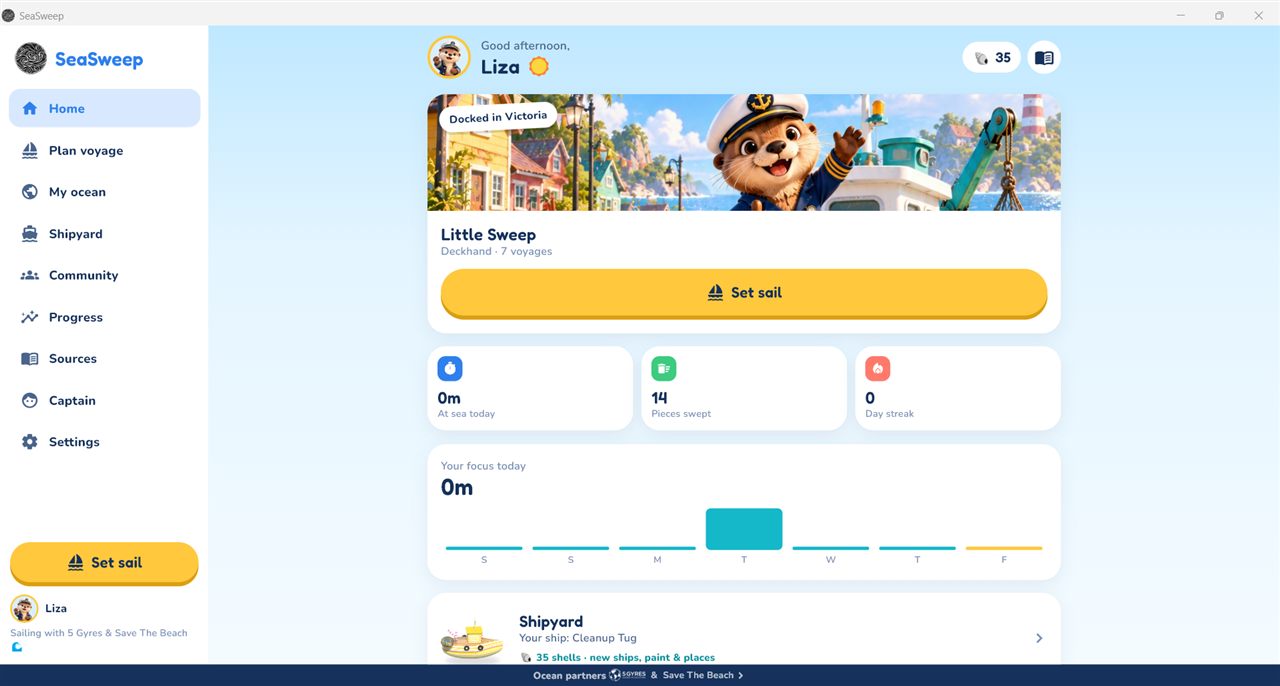
SeaSweep is a free study-focus app for Windows that closes the apps and browser tabs you choose to block until your study session ends; each session is a voyage along a real sea route. Every study minute earns a shell; shells unlock new ships, designs and routes. No ads. Made by Liza, founder of slowden.com, and published on the Microsoft Store under the publisher name JayRi.
Not to be confused with the Steam game Sea Sweeper or other projects with a similar name.
Get SeaSweep free on the Microsoft StoreRead the launch post
How does a SeaSweep voyage work?
- Pick a route. There are 22 real sea routes, from Malé to Villimalé (10 minutes) to Sydney to Auckland (3 hours). Fourteen are open from the start; eight Explore routes, such as Tahiti to Bora Bora and Ushuaia to Antarctica, unlock with shells.
- Choose how long. The route's time is the most you can sail. Slide it down to as little as 5 minutes and your ship still reaches the port.
- Dock your distractions and set sail. Write down what you will study, pick what to dock, and hold to set sail.
- Study while the ship sails. Watch the voyage from above the ocean, on a globe or from the deck, with ocean facts along the way. Sound is off unless you turn it on.
- Reach port. The voyage goes in your logbook, with the pieces of trash your ship swept and a note if you want one.
Is SeaSweep a study timer or a Pomodoro timer for PC?
SeaSweep is a study timer for Windows that also blocks distractions. Each voyage is one timed focus session: you choose the length, from 5 minutes up to the route’s full time (the longest route is 3 hours), and the distractions you docked stay closed until the ship reaches port.
It does not call itself a Pomodoro timer and does not run automatic work-and-break cycles. If you like the Pomodoro method, sail a 25-minute voyage, take your break, then set sail again. Voyages of 45 minutes or longer earn 25% more shells, so it rewards longer deep-work sessions too.
What does SeaSweep block on Windows?
Only what you dock. While a voyage sails, SeaSweep checks the window in front every 0.7 seconds. A docked program is shown a lock screen and closed; a docked website's browser tab is shown a lock screen and closed.
| You can dock | Examples |
|---|---|
| Websites | Instagram, YouTube, Snapchat |
| Games | Steam, Epic Games, Roblox, Minecraft, Riot Client, League of Legends, Valorant, Battle.net, Fortnite, Poki, CrazyGames |
| Programs | Discord, WhatsApp, Telegram, Spotify, Netflix, or any program that is open on your laptop |
Looking for a focus app for Windows that closes games? That is what docking does: Steam, Roblox, Minecraft and browser game sites close for the whole session. Windows’ built-in Focus only silences notifications, and Forest has no Windows app; see SeaSweep vs Forest vs Windows Focus, or the step-by-step answer to how to block games on Windows while you study. Looking for Study Bunny on a Windows laptop? Its official listings do not name Windows: is Study Bunny available on PC?
Study sites stay open: Wikipedia, Khan Academy, BBC Bitesize, DuckDuckGo and r/studying are never closed, even in a docked browser. The app's Sources screen finds real study material, with no AI answers, while the voyage keeps running.
No quitting halfway. There is no pause or quit button. During a voyage, SeaSweep's own window cannot be closed, and Task Manager and the uninstall screens are closed too. If SeaSweep is force-closed or the laptop is turned off, the voyage counts as failed.
What do you earn for studying?
Shells. One shell for every minute you study, plus 25% more on voyages of 45 minutes or longer. Shells come only from studying; they cannot be bought.
Spend them in the Shipyard on 9 ships (from the free Cleanup Tug to the Deep Blue Submarine at 5,000 shells), 28 designs, 12 paints and the 8 Explore routes.
Can you study with friends?
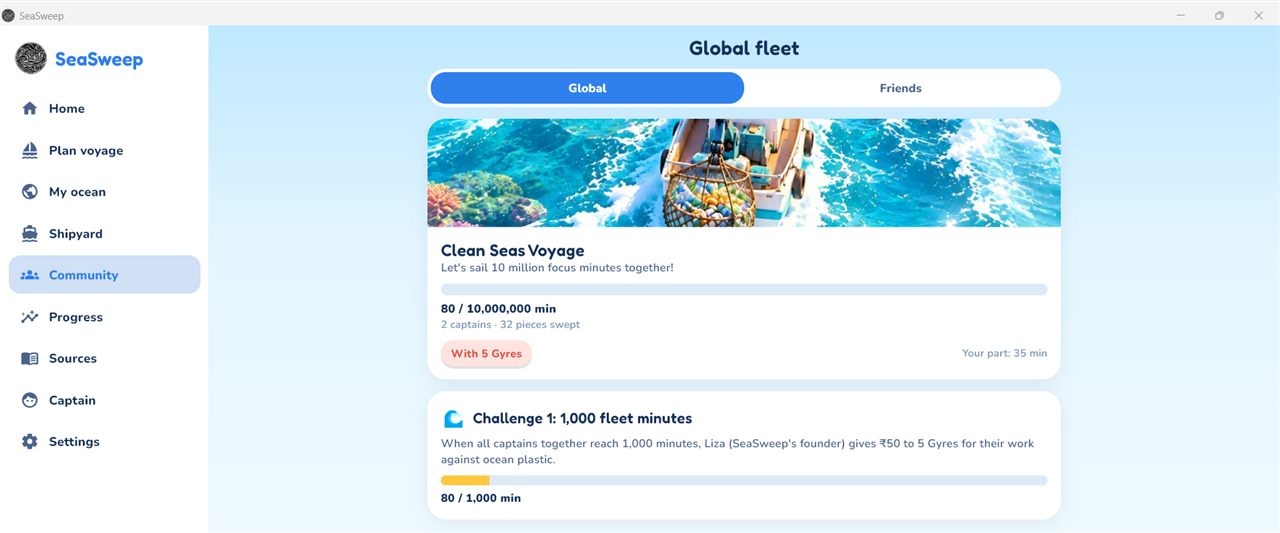
Yes. Every captain has a crew code; friends add each other with it and see each other's minutes. There is a global leaderboard that shows only your captain name, and you can hide yourself from it. All captains also sail together toward fleet challenges.
Does SeaSweep really clean the ocean?
Not by itself, and SeaSweep says so plainly. The trash your ship sweeps in the app is a picture of your focus. The real ocean work is done by SeaSweep's two partners: the 5 Gyres Institute, which researches and campaigns against plastic pollution, and Save The Beach, which cleans beaches and regrows coral reefs in the Maldives.
When all captains together reach a fleet challenge goal, Liza gives money to the 5 Gyres Institute: ₹50 at 1,000 fleet minutes, then ₹200 at 5,000, ₹500 at 10,000, ₹1,000 at 25,000 and ₹2,000 at 50,000 and every 50,000 after that. Donating yourself is optional; the app's donate button opens 5 Gyres' own website.
What do you need to use it?
- A Windows PC or laptop. The Microsoft Store lists Windows 10 version 17763.0 or higher (Windows 11 included) on an x64 processor.
- A free SeaSweep account, made with an email address or with Google, so your voyages are saved.
- An internet connection for the leaderboard, your crew and fleet challenges.
You can set SeaSweep to start with Windows. Your list of programs and which window is open are checked only on your computer and never uploaded. Read the SeaSweep privacy policy.
Questions about SeaSweep
What is SeaSweep?
SeaSweep is a free study-focus app for Windows that closes the apps and browser tabs you choose to block until your study session ends; each session is a voyage along a real sea route. You pick a route, study while your ship sails, and it reaches port when the session ends.
Is SeaSweep free?
Yes. SeaSweep is free on the Microsoft Store, shows no ads and contains no advertising code. Shells, ships and designs are earned only by studying; they cannot be bought.
Which apps and websites does SeaSweep block?
Only what you dock. You can dock Instagram, YouTube and Snapchat tabs, a Games group (Steam, Epic Games, Roblox, Minecraft, Riot Client, Battle.net, Poki, CrazyGames and more), common programs such as Discord, WhatsApp, Telegram, Spotify and Netflix, and any program that is open on your laptop.
Can I still use study websites during a voyage?
Yes. Wikipedia, Khan Academy, BBC Bitesize, DuckDuckGo and r/studying stay open even if your browser is docked, and the app's Sources screen finds study material without AI answers while the voyage keeps running.
Can I pause or quit a voyage?
No. There is no pause or quit button. You can make a voyage shorter before you set sail (down to 5 minutes) and the ship still reaches port. If SeaSweep is force-closed or the laptop is switched off, the voyage counts as failed.
Does SeaSweep clean the ocean?
Not by itself. The trash your ship sweeps in the app is a picture of your focus. Real ocean work is done by SeaSweep's partners, the 5 Gyres Institute and Save The Beach. When all captains together reach a fleet challenge goal, starting at 1,000 minutes, SeaSweep's founder gives money to the 5 Gyres Institute.
Is there a free study timer for PC?
Yes. SeaSweep is a free study timer for Windows PCs and laptops, on the Microsoft Store. You set how long you will study, from 5 minutes up to 3 hours, and it closes the apps and browser tabs you chose to block until the time is up.
Is SeaSweep a Pomodoro timer?
It does not call itself one, and it does not run automatic work-and-break cycles. Each voyage is one timed focus session that you set, so you can sail a 25-minute voyage, take your break, and set sail again. Voyages of 45 minutes or longer earn 25% more shells.
Is there a free app blocker for Windows 11?
SeaSweep is a free app blocker that works during study sessions. The Microsoft Store lists it for PCs running Windows 10 version 17763.0 or higher, which includes Windows 11, on x64. It closes the programs and browser tabs you dock until the session ends.
How do I stop getting distracted while studying on my PC?
Remove the distraction before you start. In SeaSweep you write down what you will study, dock the apps and sites that pull you away, and set sail. They close until the voyage reaches port, and there is no pause or quit button halfway.
Is there a Forest app for PC?
Forest lists phone apps and Chrome and Firefox extensions, not a Windows app. SeaSweep is a separate free focus app for Windows with an ocean theme; it is not affiliated with Forest. See SeaSweep vs Forest vs Windows Focus for the side-by-side.
Does SeaSweep help with ADHD?
SeaSweep is a study timer and distraction blocker, not a medical tool, and it makes no health claims. Some people find that closing distracting apps before they start makes a study session easier; for ADHD itself, talk to a doctor or another qualified professional.
Is there an app to stop doomscrolling on a PC?
SeaSweep closes the Instagram, YouTube and Snapchat tabs and the apps such as Discord or WhatsApp that you dock, for as long as the study session you set. It blocks nothing outside a voyage, so it stops the scrolling while you study rather than all day.
Is SeaSweep on phones or Mac?
Not yet. The Windows version on the Microsoft Store is the one that is out now.
Get SeaSweep on the Microsoft Store
SeaSweep is a separate app by the founder of SlowDen, the free browser-game site. It is not a game on SlowDen.
Done with a voyage? Take a short break with free daily puzzle games, classroom brain-break games or puzzle games on SlowDen, then set sail again. Teachers and parents: see SlowDen for teachers. The full story of the app is in the SeaSweep launch post.