SlowDen.com › Blog › How to study for finals effectively
How to study for finals effectively: 7 research-backed steps, and a free app that closes Steam, Roblox and Minecraft
to study for finals effectively, swap rereading for testing yourself, spread your sessions over several days instead of one long cram, mix topics within a session, and protect each session from distractions. On a Windows PC, a free app called SeaSweep can close Steam, Roblox, Minecraft, Discord and other apps you choose for exactly the length of a session, then give them back.
This article was written with the assistance of an AI writing program. The study research is the Association for Psychological Science summary of Dunlosky et al. (2013); SeaSweep facts were read from its source code on 26 November 2026. Nothing here is medical advice.
I make SeaSweep, a free study-focus app for Windows, and SlowDen.com, a free browser-game site. So this isn't an anti-games guide. It's a plan for getting finals done so the games are guilt-free.
What is the most effective way to study for finals?
The review by Dunlosky and colleagues compared ten common study techniques. Two came out as high utility: practice testing (quizzing yourself) and distributed practice (spacing study over time). Highlighting and rereading came out low. That's the core of studying effectively: less rereading, more recalling.
How do I study for finals effectively, step by step?
- List every exam and what's on it. One line per topic. This is your map.
- Spread it out. Give each subject short sessions on several different days rather than one marathon the night before.
- Start every session with a self-test. Close the notes, write what you remember, then check. The gaps are what you study next.
- Mix related topics. Alternate problem types within a session, so you practise choosing the method, not just repeating it.
- Use past papers. They are the closest thing to the real exam, and they're a test by design.
- Make each session distraction-proof. Phone in another room, and game launchers closed for the session, not "when you get distracted".
- Sleep. An all-nighter trades tomorrow's recall for tonight's hours.
How long should a finals study session be?
Long enough to finish one task, short enough that you will start it: 25 to 45 minutes works for many students, followed by a short break. Finishing a session matters more than its length.
Is there an app that closes Steam and Roblox while I study?
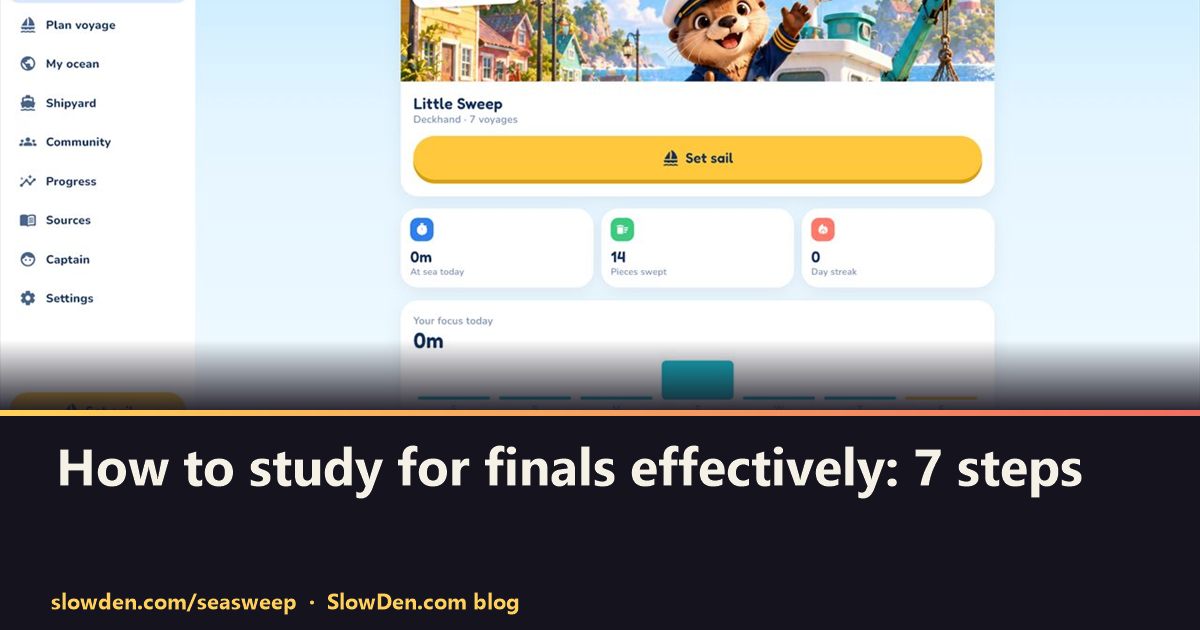
Yes. On Windows, SeaSweep turns a study session into a sea voyage:
- you pick a route, and its length is your session, from 5 minutes up to 3 hours;
- while your ship sails, SeaSweep checks the window in front every 0.7 seconds;
- if you turn on its Games group, it closes Steam, Epic Games, Roblox, Minecraft, Riot Client, League of Legends, Valorant, Battle.net and Fortnite, plus Poki, CrazyGames and Roblox tabs in your browser;
- Task Manager is closed too during a voyage, and there's no pause button, so pick a length you will actually finish;
- when the ship arrives, everything opens normally again.
SeaSweep is not a Pomodoro timer: it runs one voyage at a time, of the length you choose. It's free on the Microsoft Store. Full detail: how to block games on Windows while studying.
What if finals are only a week away?
Then the same rules apply, compressed: test first, cover every topic at least twice, and use past papers. Our day-by-day version is how to study for finals in a week, and for planning the weeks before, how to make a study schedule for exams.
Prefer the command line? In Windows Terminal: winget install 9N3F281GJT5T -s msstore
Get it: SeaSweep on the Microsoft Store (Store ID 9N3F281GJT5T). More: slowden.com/seasweep. Free browser games for after finals, from the same founder: SlowDen.com. SeaSweep is made by a 5 Gyres Ambassador. #5GyresAmbassador
Common questions
What is the most effective way to study for finals?
Practice testing and spacing your study over several days. A large review of study techniques rated both high utility, and rated rereading and highlighting low.
How many hours a day should I study for finals?
There's no single right number. Several focused 25 to 45 minute sessions with breaks usually beat one long, distracted block.
Can I block Steam, Roblox and Minecraft while I study?
Yes. SeaSweep for Windows closes them, and other game launchers, during a study voyage if you turn on its Games group.
Is SeaSweep a Pomodoro timer?
No. It runs one focus voyage of the length you choose, from 5 minutes to 3 hours, and closes the apps and tabs you listed until it ends.
Is SeaSweep free?
Yes. It's free on the Microsoft Store, for Windows.
Browse the games
All 2961 free browser games on SlowDen — no download, no sign-up.